DentalCAD 3.3 Chemnitz: How AI‑Driven Digital Dentistry Workflows Are Reshaping Restorative and Implant Design
As dental technology evolves at breakneck speed, the shift from manual wax‑ups to fully digital workflows has become the new normal. And the pace of software innovation often determines whether a clinic or lab can stay ahead of the competition. Recently, exocad released DentalCAD 3.3 Chemnitz – a version that CEO Tillmann Steinbrecher describes as “a major leap forward in digital dentistry.” This release is not a mere feature dump; it is built around three core pillars: intelligent automation, seamless workflows, and efficiency gains – each targeting real‑world pain points in clinical and laboratory settings.
This article takes a deep dive into the key upgrades, helping you quickly understand how these new capabilities can enhance your daily design routine.
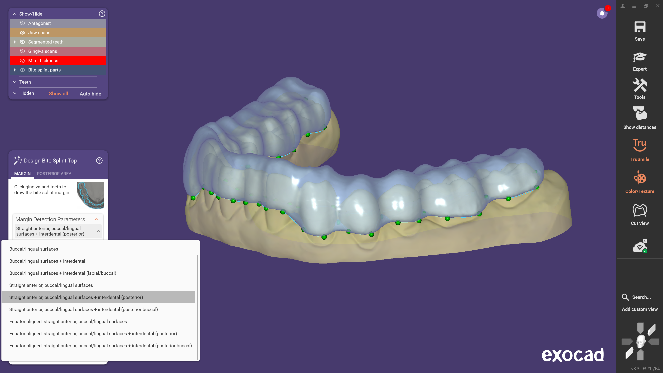 |  |
Optimized AI‑assisted occlusal splint design – faster, smarter automation | Real‑time anatomical morphing for multi‑unit cases (now with chain mode) |
 |  |
New abutment design capabilities – more flexibility and precision | New Inspira™ tooth database – specifically designed for crown and bridge restorations |
1. AI‑Powered Multi‑Unit Design: Faster Posterior Restorations
In traditional workflows, designing multiple adjacent posterior crowns or bridges often involves repetitive steps that are time‑consuming and fatiguing. DentalCAD 3.3 Chemnitz introduces an AI‑assisted multi‑unit design feature, enabling users to design up to three adjacent posterior crowns or three‑unit posterior bridges in one go.
Efficiency gain: The system automatically detects adjacency relationships and intelligently generates plausible morphology, dramatically reducing clicks and adjustments.
Simplified operation: There’s no need to repeat settings for each tooth; the entire process is compressed into fewer steps, ideal for high‑volume cases.
This means technicians can focus more on aesthetic and functional fine‑tuning rather than repetitive modeling chores.
2. Personalized Abutment Design: New Possibilities for Implant Restorations
The success of an implant restoration depends not only on surgery but equally on the precision of the abutment design. The revamped Implant Module in this version offers two major highlights:
Personalized abutment solutions: The software can generate customized abutment shapes automatically based on patient anatomy, offering greater design flexibility.
Optimized editing tools: Adjusting emergence profiles, angulation, or screw channel positioning is now more intuitive and responsive.
These improvements make complex cases more manageable and reduce the risk of clinical complications caused by design errors.
3. One‑Click Hybrid Denture Workflow: Simplifying All‑on‑X Design
All‑on‑X cases have always been challenging, especially the precise fit between the implant bar and the superstructure. DentalCAD 3.3 introduces a split denture workflow that allows users to design both the implant bar and the superstructure simultaneously within a single project.
Automatic splitting: The software divides the final design into two perfectly fitting components.
Minimal manual adjustment: Previously time‑consuming trial‑and‑fit steps are drastically shortened, accelerating the overall design cycle.
This function is particularly beneficial for high‑volume restoration centres, boosting throughput and reducing remakes.
4. Ecosystem Integration: Partnering with Ivoclar and Amann Girrbach
Digital dentistry thrives on interoperability. DentalCAD 3.3 adds two major integrations:
Ivoclar Digital Denture Workflow: Full alignment with Ivoclar’s clinical workflow helps reduce patient visits and improves communication between clinicians and technicians.
Amann Girrbach Artex Print&Click: Through the Model Creator module, users can quickly place 3D‑printed models onto the Artex articulator without tools or plaster.
These integrations allow users to work within a more open ecosystem, minimising data conversion errors and saving time.
5. Polished Details: More Features That Enhance Everyday Experience
Beyond the headline upgrades, DentalCAD 3.3 offers several thoughtful enhancements:
Symmetric tooth morphology editing: Designed for aesthetic restorations, enabling one‑click mirroring for a balanced smile.
AI‑accelerated occlusal splint design: Automatically generates splint morphology for faster turnaround.
Real‑time anatomical morphing (with chain mode): Simultaneously deforms multiple teeth for bridges and multi‑unit cases while maintaining anatomical harmony.
New input search bar: Quickly locate commands and tools, lowering the learning curve.
Integrated Inspira™ tooth database: Provides a rich library of aesthetic tooth shapes.
Support for KaVO PROTARevo articulator: Bringing the total number of compatible articulators to 20 models.
DentalCAD 3.3 Chemnitz is far more than a routine update – it’s a thoughtful response to the core needs of users. Through AI automation, seamless cross‑module connectivity, and deep integration with external partners, this version lowers the barrier to complex case design while significantly improving the fluidity of daily operations.
For dental professionals looking to boost productivity and expand their restorative and implant capabilities, this upgrade is well worth considering.
Keywords:exocad DentalCAD 3.3, digital dentistry, AI multi‑unit design, personalised abutment, All‑on‑X design, implant bar, Ivoclar workflow, Amann Girrbach, Artex articulator, aesthetic restoration, occlusal splint design, tooth morphology editing, Inspira database, dental CAD software